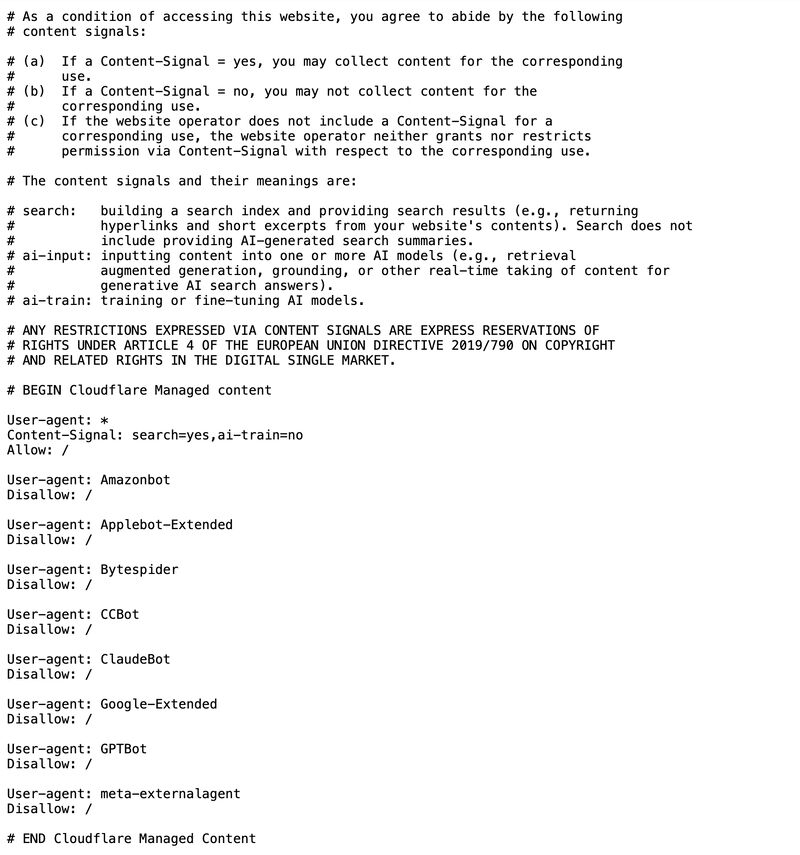
If you’re using Cloudflare to proxy your website, double-check your robots.txt settings. You may be blocking AI bots without realizing it.
Cloudflare's UI is (intentionally?) confusing.
You can select “Do not block (allow crawlers)” under Block AI training bots and still end up disallowing all bots.

A few quick checks:
- Open your robots.txt (yourdomain/robots.txt) and look at what you’re telling bots. If you don’t understand it, paste it into ChatGPT and ask what it does.
- If you see something like
Disallow: /, you are likely telling bots not to visit your site at all. - If that’s not your intention, find Manage your robots.txt in Cloudflare and choose “Disable robots.txt configuration.”
If AI visibility matters to you (and it should), make sure your infrastructure isn’t quietly telling bots to go away.